Building an AI-powered IT Ops agent for Onpremise servers using Microsoft Foundry Agent Service , Azure Arc & MCP
I have been working as App/Infra Solution Architect with Microsoft from 5 years. Helping diverse set of customers across vertical i.e. BFSI, ITES, Digital Native in their journey towards cloud
Introduction:
Recently, a customer asked me a question that really got me thinking:: "Can we build an AI agent that integrates with our datacenter — one that IT admins talk to in plain English, and it figures out which tools to run, in what order, to get the job done?"
Not a chatbot. Not a script wrapper. An agent that reasons about the problem, picks the right automation tools,runbooks & executes them, and explains what it found — all while respecting Security controls & ITSM policies
So I built one as MVP for Enterpise customer IT admins, Here are details of Solutions
Solution Overview
The solution is an AI-powered IT Operations agent that manages on-premises servers through conversation. You type "Why is my ABC server running slow?" and the agent SSHs into the server, runs diagnostics, analyzes the results, and tells you the root cause — in under few seconds depeneds on nature of questions
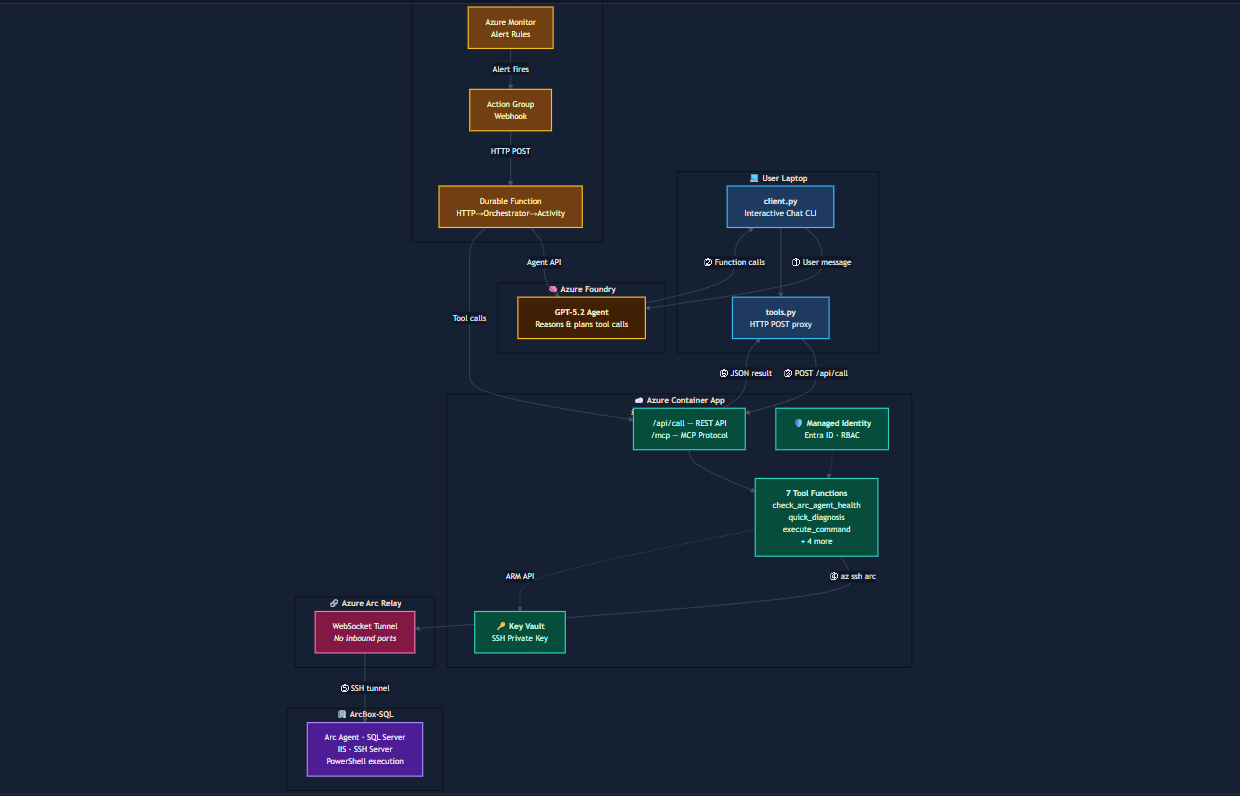
Following are high level components of this solution
Azure Arc : It Act as bridge between Azure and Datacenter servers, Your servers stay in your datacenter. Azure Arc installs a lightweight agent that creates a secure outbound private connection to Azure — no VPN, no public IPs, no firewall holes. The AI agent reaches your server securely through this relay using SSH
MCP Server: Building an MCP server for Azure Arc using fastMCP SDK , transform the API into two core AI-accessible components: Tools & Resources while Azure Arc API operations involve complex resource IDs and specific command syntax. An MCP server abstracts this so you can simply ask, "Which of my Arc servers in the datacenter have missing security patches"
AI Agent: Build using Foundry Agent SDK and hosted on Foundry Agent service, The agent receives your request, decides which tools to call and in what order, interprets the results, and follows up if needed. Ask it to investigate high CPU — it runs a full diagnosis first, spots a memory pressure error in the output, then pulls the event logs to confirm the root cause. That multi-step reasoning is what separates an agent from a converational bot
WebApp: Chat UI Interface which interacts with AI Agent running in Foundry Agent service runtime, it serves the chat UI, and it handles the agent conversation loop . When you type a message, the backend sends it to the Foundry Agent, waits for tool call requests, executes them by calling the MCP server's REST API, submits results back to the agent, and streams the final reply to your browser
Durable Functions: Alerts for Arc server configured in Azure monitor, when something goes wrong on Arc enable server — high CPU, a service crashes, disk filling up — Azure Monitor fires a webhook to a URL. That URL needs to be something that's always listening and ready to receive it.Functions gives us that always-on webhook endpoint without running a dedicated server 24/7. It sits idle costing nothing until an alert arrives, spins up in milliseconds, hands the alert to the agent, and goes back to sleep

Four Major componenst of Architecture:
| Component | What it does | Where it runs |
|---|---|---|
| Web App | Chat interface + handles the AI-to-tool execution loop | Azure Container App |
| AI Agent | Reasons about problems, decides which tools to call | Microsoft Foundry Agent Service |
| MCP Server | Executes SSH commands on servers, returns results | Azure Container App |
| Durable Function | Receives alert webhooks, triggers autonomous investigations | Azure Functions |
Architecture Flow

Key Design Decisions
Azure Arc:
Azure Arc Agent enable onpremise servers to become Az ARM resource, which allow to managed Arc enable using Azure supported interface like UI, CLI and Rest APIs security without being exposed to internet
Foundry Agent Service :
Zero infrastructure to manage. No GPU provisioning, no container orchestration for the AI runtime.Built-in conversation state. Foundry manages threads natively — each conversation has persistent memory across messages.Native tool-calling orchestration. Enterprise identity and compliance, agent authenticates via Managed Identity and Azure RBAC — same identity layer as every other Azure resource
SSH over Run Command APIs:
Azure Arc gives you two ways to execute commands on your on-prem server.
Run Command (Azure REST API) — sends a PowerShell script to Azure, which queues it on the Arc agent, which executes it, which reports the result back through Azure. Round trip: 45-90 seconds. Every single time.
SSH via Arc — opens a real-time SSH tunnel through the Arc relay. The MCP server runs az ssh arc, connects to the server's SSH daemon, executes the PowerShell command, gets the output. Round trip: 5-7 seconds. That includes the relay setup, SSH handshake, and command execution.SSH user can be restricted to specific OS-level groups (Event Log Readers, Performance Monitor Users)
Security Layers
All Authentication and Authorization are faciliated via Entra ID using managed identity of Azure, no local creds or Hardcoded credentails
Layer 1 : Identity & Authentication
Managed Identity (All Cloud Components)
| Component | Identity Type | Authenticates To |
|---|---|---|
| Web App (Container App) | System-Assigned MI | Azure AI Foundry Agent Service |
| MCP Server (Container App) | System-Assigned MI | ARM API, Key Vault, Arc SSH Relay |
| Durable Function | System-Assigned MI | Azure AI Foundry Agent Service |
Layer 2: Authorization

Layer 3: Network & Transport

Layer 4: OS/App Controls

Pre-Requisites
Azure Subscription
Onpremises Windows/Linux Server onboarded to Azure via Arc Agent
Az AI foundry Project with Reasoning LLM models (GPT models)
Python 3.11
💡 Tip:** If you don't have an Arc server yet, you can use Azure Arc Jumpstart to set one up quickly with ArcBox.
Walkthrough of Solution Demo:
Part 1: Read-Only Operations (no ticket required)
First, we demonstrate read-only operations — health checks, diagnostics, event log queries, service status. These run freely without any change ticket because they don't modify the server.

Health-Check:
Question on health check of server triggers tools call in MCP for server health check which perform several steps on server and responsd with results with Server Perfromance, Last errors and its service review


Part 2: Change-Controlled Operation (ticket required)
Next, an admin requests a risky operation — restarting a critical service. The agent does not proceed. Instead, it informs the admin that this is a change-controlled operation and asks for a valid ServiceNow CHG or INC ticket number.

Part 3: Ticket Validation — Denied
The admin provides a ticket number. The agent validates it against ServiceNow and finds the ticket is pending approval — not yet authorized for execution. The agent politely denies the request and asks the admin to get the ticket approved first.

Part 4: Ticket Approved — Execution
The admin returns after the ticket is approved. The agent re-validates against ServiceNow, confirms the ticket is now approved, and proceeds to execute the service restart. It reports the result back to the admin with the ticket number referenced for audit

For more details on Internal and source code of this solution,check out github repo:
Osshaikh/IT-Ops-Agent